UX Design

Planner Pal

2 teammates

3 weeks

This project was conducted during the course Ethics in Design in my third year at Halmstad University. It is grounded in speculative design, using a newspaper as a design fiction artefact to explore the growing problem of increasing trust in AI within higher education.We focused on a particularly vulnerable target group - students with autism or students with similar challenges in their studies and daily life.

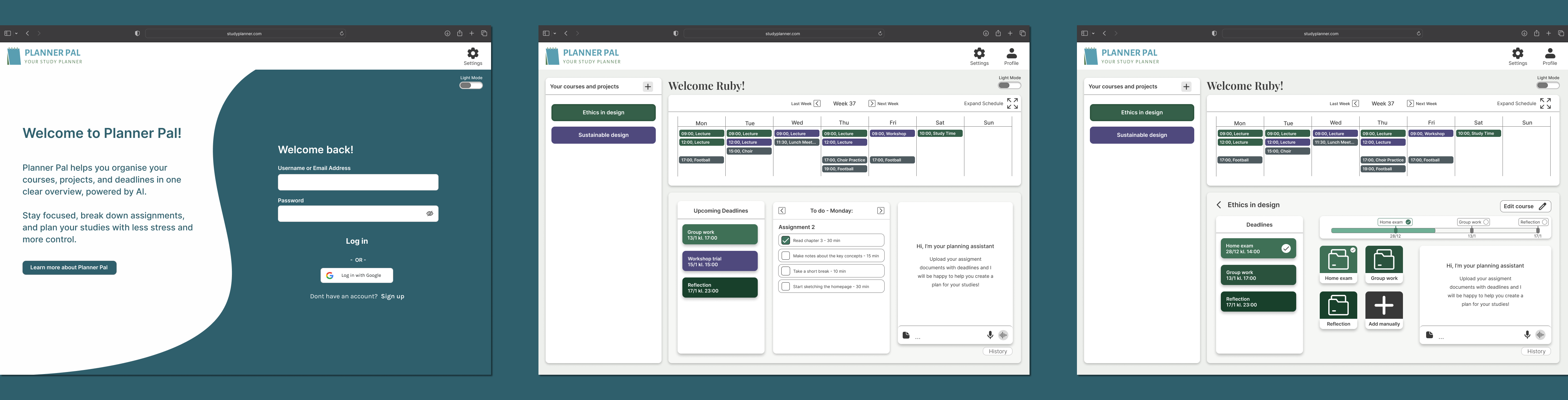
Through desktop research, I examined the target users’ context, exploring key capabilities and enablers, and investigated how to design specifically for this group. This research formed clear guidelines that guided the prototyping of our digital artefact. Planner Pal was developed to provide students with a structured, clear and guided planning tool, aimed at reducing cognitive load while increasing confidence and a sense of security.

My role in the project was flexible, but I focused heavily on accessibility to ensure that Design-for-All and universal design principles were carefully applied throughout the process.

Challenges

- Increasing reliance on artificial intelligence in education risks reducing human competencies, critical thinking, and independent learning.

- Students with autism or similar challenges face difficulties with structure, planning, time management, sensory overload and stress.

- Designing for a neurodiverse audience requires balancing accessibility, usability, and cognitive load.

Solution

- Developed Planner Pal as prototypes in Figma, a digital planning tool to support students with different needs.

- Provides structured guidance, course overviews, project planning, time blocks, checklists, progress indicators and an optional chatbot.

- Design focuses on simplicity, clarity, predictable navigation and minimal cognitive load.Applied Design-for-All and Universal Design principles to ensure accessibility for neurodiverse users.

Learnings

- I've gained insight into designing for neurodiverse users or users with special needs, as well as designing for a wide range of potential users.

- I've deepened my understanding of ethical design, particularly around AI support and user autonomy.

- I reinforced the value of Design-for-All and Universal Design principles in creating inclusive and accessible experiences.

- I improved skills in translating research insights into actionable UX design decisions.

Background

This project builds on speculative design and design fiction methods explored in an earlier project in this course, where we created the fictional news platform AIbladet, based on the popular Swedish newspaper and site Aftonbladet, to illustrate the societal challenges of increasing trust in AI within education. The design fiction highlighted how AI could:

- Replace human judgment
- Reduce critical thinking
- Create ethical dilemmas around responsibility, equality, and inclusion.

The project addresses the broader societal problem of over-reliance on AI with risks such as:

- Amplifying biases
- Reducing human agency
- Affecting vulnerable students

Desktop research

Contextual Understanding

For this project, I focused on a particularly vulnerable target group - students with autism or similar learning challenges. University students with autism face unique challenges that affect learning, social interaction, and well-being. They often struggle with social rules, flexibility, planning, and information processing, while sensory overload and unclear instructions increase stress and anxiety (Van Hees et al., 2015; Davis et al., 2021). Academic outcomes can be negatively affected, and support services are often insufficient or poorly matched to individual needs (Cox et al., 2023; Syriopoulou-Delli et al., 2024).

Contextual Impact on Design

The needs of students with autism shaped every design decision. To reduce stress and cognitive load, we focused on clear language, consistent icons with text, and simple, structured layouts (Rehan, 2025; Autism Sverige, n.d.). Tasks are broken into manageable steps with visual progress indicators, while minimal animations, soft colors, and plenty of whitespace prevent sensory overload (Le Cunff, Giampietro, & Dommett, 2024; Pavlov, 2014). Users can customize fonts, colors, and sound, and interact with multiple media types to suit their preferences (Ciurana et al., 2024; Fabri & Andrews, 2016). Overall, the platform is predictable, guiding, and adaptable, supporting autonomy and confidence for neurodiverse students.

Relevant Design Knowledge for Planning Tools

Designing planning systems requires addressing cognitive load by presenting information in a clear, cohesive way. Information is often fragmented, so tools must consolidate resources, notes, tasks, and documents in a single view to avoid confusion (Jones et al., 2007). Planning tools should also automatically generate structure as users organize their tasks, turning planning actions into clear organization (Jones et al., 2007). Features like “recent changes” or summary entry points allow users to reorient themselves after breaks, maintaining continuity and reducing stress (Copic Pucihar et al., 2016). Clear temporal representations, such as color-coded time blocks and simple navigation, support task overview and time management, making planning more manageable and less cognitively taxing (Shin & Yoon, 2021).

These principles directly informed Planner Pal’s design, ensuring tasks and schedules are visually structured, easy to follow, and adaptable to neurodiverse students’ needs, ultimately reducing cognitive overload and stress.

Developed guidelines

Based on this contextual understanding, five guidelines were developed to shap Planner Pal. They ensure simple language and icons, clear structure, minimal visual complexity, stress-reducing time visualization, and integration of all resources in one view.

Design-for-all principles

Based on this contextual understanding, five guidelines were developed to shap Planner Pal. They ensure simple language and icons, clear structure, minimal visual complexity, stress-reducing time visualization, and integration of all resources in one view. Following these principles aligns with Universal Design and Design-for-All, making the interface predictable, accessible and confidence-boosting.

Principle n. 1

"

Design of IST products, services and applications which are demonstrably suitable for most of the potential users without any modifications.

I understood the intent of this principle is to make interface understandable and usable immediately by as many users as possible, without the need for individual adaptations or explanations. In the final design,

- All actions and buttons use simple, direct wording and avoid metaphors and implicit instructions.
- Icons are always paired with text labels to support recognition and reduce ambiguity, ensuring immediate understanding without prior learning.

This can be directly related to the first guideline (1) Clear and Consistent Language and Iconography as well as the principles for universal design. To ensure a broad use and personalized design, Universal Design complemented the Design-for-all principles by providing concrete, practical strategies to implement accessibility, usability and inclusivity in the interface.

- Simple and intuitive Use: The system is easy to understand regardless of prior experience.
- Perceptible information: Important information is clearly communicated using text, icons, and visual hierarchy.
- Low physical effort: Minimal steps and reduced interaction complexity lower the effort required to use the tool.

Principle n. 2

"

Design of products which are easily adaptable to different users.

I used the second principle to ensure that the with the the system support different preferences, abilities and ways of working, without excluding any users. In the final design,

- Text, voice, images and video was available as input.
- The chatbot is accessible via both typing and speech.
- Text has adjustable size, contrast and color themes.

This can be directly related to the fourth guideline (4) Design to reduce stress through time representation and indirect to the third guideline (3) Minimal Visual Complexity, as well as the universal principles,

- Flexibility in use: The design accommodates a wide range of preferences and abilities.
- Tolerance for error: Confirmations and feedback prevent unintended actions.
- Equitable use: Customisation options are available to all users, not only a specific group.

Principle n. 3

"

Design of products which have standardized interfaces, capable of being accessed by specialized user interaction devices’.

The third principle was used to ensure that the with the the system is compatible with assistive technologies and alternative interaction methods. The final design,

- Has full support for keyboard navigation by ensuring clear hierarchy.
- Has sufficient spacing between clickable areas for alternative input methods.

This can be directly related to the fourth guideline (4) Design to reduce stress through time representation and indirect to the third guideline (3) Minimal Visual Complexity, as well as the universal principles,

- Size and Space for Approach and Use: Adequate spacing and layout support diverse interaction methods.
- Perceptible Information: Information is accessible across different sensory modalities.
- Low Physical Effort: Reduced scrolling and simplified navigation support alternative input devices.

My thoughts...

Through this project, I gained valuable insights into designing for neurodiverse users and individuals with special needs, while also considering the broader needs of a diverse user base. I developed a deeper understanding of ethical design, particularly in supporting user autonomy and making responsible design decisions. The project reinforced the importance of applying Design-for-All and Universal Design principles to create inclusive, accessible, and usable experiences. Additionally, I strengthened my ability to translate research findings into actionable UX design decisions, ensuring that all design choices are grounded in real user needs.

Figma wireframes